


I've put together some of the most used commands you'll more or less use every day when working with Git. These were "stashed" away in my notes, and I thought it would be good to organise them for others.
This blog will feature a short course on DevOps/Automation & AI for Network Engineers soon, with these resources serving as a component for its creation and referencing.
Below, you'll find the commands in code-blocks, a nifty PDF cheat guide, and some images that you can print off to hang on your wall and show off to all your friends/ gits! (if that's your thing)
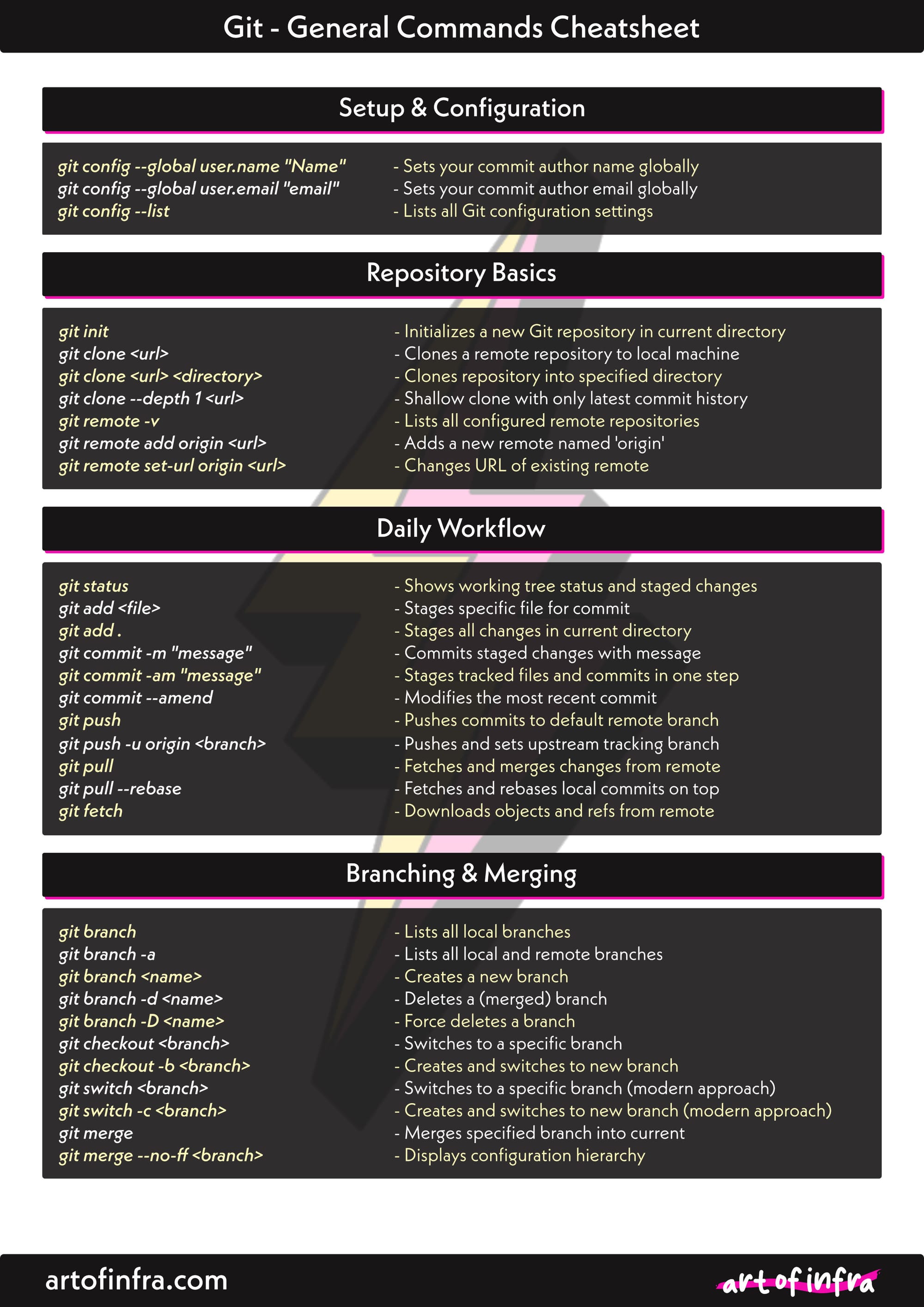
Setup & Configuration
git config --global user.name "Name" - Sets your commit author name globally
git config --global user.email "email" - Sets your commit author email globally
git config --list - Lists all Git configuration settings
Repository Basics
git init - Initialises a new Git repository in current directory
git clone <url> - Clones a remote repository to local machine
git clone <url> <directory> - Clones repository into specified directory
git clone --depth 1 <url> - Shallow clone with only latest commit history
git remote -v - Lists all configured remote repositories
git remote add origin <url> - Adds a new remote named 'origin'
git remote set-url origin <url> - Changes URL of existing remote
Daily Workflow
git status - Shows working tree status and staged changes
git add <file> - Stages specific file for commit
git add . - Stages all changes in current directory
git add -p - Interactively stage hunks of changes
git commit -m "message" - Commits staged changes with message
git commit -am "message" - Stages tracked files and commits in one step
git commit --amend - Modifies the most recent commit
git push - Pushes commits to default remote branch
git push -u origin <branch> - Pushes and sets upstream tracking branch
git pull - Fetches and merges changes from remote
git pull --rebase - Fetches and rebases local commits on top
git fetch - Downloads objects and refs from remote
Branching & Merging
git branch - Lists all local branches
git branch -a - Lists all local and remote branches
git branch <name> - Creates a new branch
git branch -d <name> - Deletes a merged branch
git branch -D <name> - Force deletes a branch
git checkout <branch> - Switches to specified branch
git checkout -b <branch> - Creates and switches to new branch
git switch <branch> - Switches to specified branch (modern)
git switch -c <branch> - Creates and switches to new branch (modern)
git merge <branch> - Merges specified branch into current
git merge --no-ff <branch> - Merges with merge commit, no fast-forward
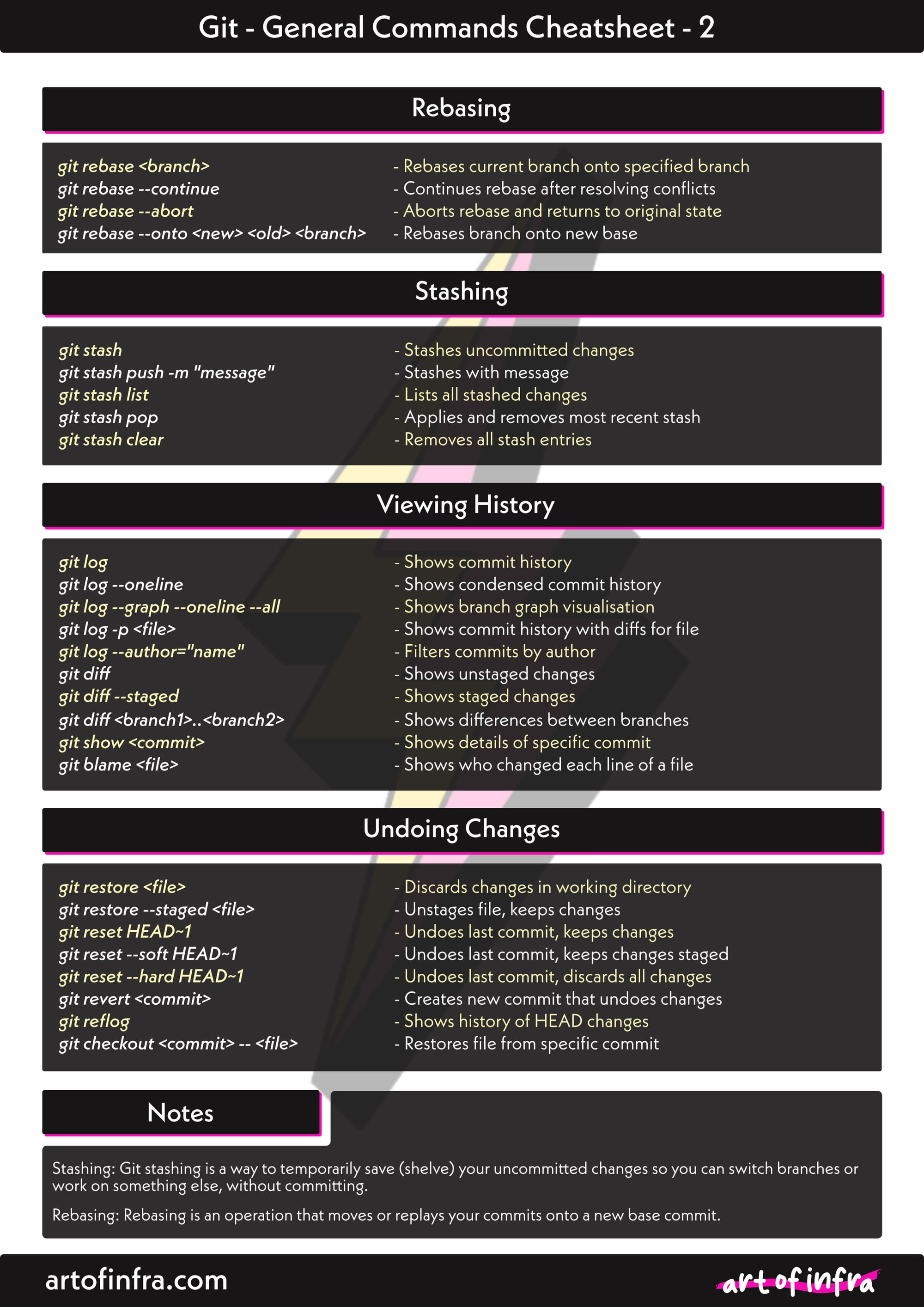
Rebasing
git rebase <branch> - Rebases current branch onto specified branch
git rebase -i HEAD~n - Interactive rebase for last n commits
git rebase --continue - Continues rebase after resolving conflicts
git rebase --abort - Aborts rebase and returns to original state
git rebase --onto <new> <old> <branch> - Rebases branch onto new base
Stashing
git stash - Stashes uncommitted changes
git stash push -m "message" - Stashes with descriptive message
git stash list - Lists all stashed changes
git stash pop - Applies and removes most recent stash
git stash apply stash@{n} - Applies specific stash without removing
git stash drop stash@{n} - Deletes specific stash entry
git stash clear - Removes all stash entries
Viewing History
git log - Shows commit history
git log --oneline - Shows condensed commit history
git log --graph --oneline --all - Shows branch graph visualisation
git log -p <file> - Shows commit history with diffs for file
git log --author="name" - Filters commits by author
git diff - Shows unstaged changes
git diff --staged - Shows staged changes
git diff <branch1>..<branch2> - Shows differences between branches
git show <commit> - Shows details of specific commit
git blame <file> - Shows who changed each line of a file
Undoing Changes
git restore <file> - Discards changes in working directory
git restore --staged <file> - Unstages file, keeps changes
git reset HEAD~1 - Undoes last commit, keeps changes
git reset --soft HEAD~1 - Undoes last commit, keeps changes staged
git reset --hard HEAD~1 - Undoes last commit, discards all changes
git revert <commit> - Creates new commit that undoes changes
git reflog - Shows history of HEAD changes
git checkout <commit> -- <file> - Restores file from specific commit
Other Notes
Stashing: Git stashing is a way to temporarily save (shelve) your uncommitted changes so you can switch branches or work on something else, without committing.
Rebasing: Rebasing is an operation that moves or replays your commits onto a new base commit.
- Consider rebasing your branch (locally created) before sending it to a shared repo.
- Rebasing fetches and "replays" your current work ontop of the latest main.
- Allows for smoother PR handling.
git switch feature/payment
git fetch
git rebase origin/main| Use REBASE when… | Use MERGE when. |
|---|---|
| the branch is local | the branch is shared |
| the branch is not pushed | the branch is already pushed |
| only you are using the branch | teammates rely on the branch |
| you want a clean, linear history | you want the true, accurate history |
| you are preparing a PR | you are working on main/release |
Default Git Editor
By default, on Mac, when editing and working with git configs in the terminal, git chooses to use VIM. We can override this (globally) to VS Code by doing the following;
git config --global core.editor "code --wait"- If you do not have the “code” $PATH installed, open VS Code, CMD + Shift + P and type “Shell Command: Install ‘code’ command in PATH”. You may see it pop up after a few letters. Follow the instructions, and now VS Code is setup as your default editor, instead of VIM.
The same can be done on Windows if you so wish.


